One license · all formats · lifetime updates

Palimpsest
The Synth That Learns Your Harmony

A modal synth with hidden sympathetic strings, like a sitar's — except these tune themselves to the intervals you play most. Lean on fifths for an evening and every note you play gets answered a fifth away. What you stop playing fades.

It never records your notes and never plays them back. It remembers the interval, not the note — in one memory per machine, shared by every instance, that outlives the session.

New in 1.1.0 — PalimpsestFx. The same remembering strings as an audio effect, behind the synth of your choice, in the same box and on the same key. See how it works ↓

Buy Palimpsest — €49 ↓ Download Demo
1 Memory per Machine
84 Presets
11 Measured Bodies
3 Stereo Outputs
+1 Effect: PalimpsestFx

See It in Action

So What Does It Change in Your Sound?

Think of a sitar, or a piano with the sustain pedal down: strings you don't touch ring along with the ones you do. Palimpsest has those hidden strings too — but they aren't tuned at random. They tune themselves to the intervals you play the most.

🎼
A Halo That Fits Your Harmony
Write in fifths and every note rings its fifth under it. Spend a week in a blues or a Phrygian scale and the instrument starts resonating in that colour. The timbre itself deepens where you use it.
🧬
A Preset That Is Never Frozen
The same patch sounds different on your machine and on mine — and different on yours a month from now. Nobody else's copy of a preset sounds like yours.
📌
Keep It When You Like It
Found the sound? Freeze memory here stores it in the project, so that track stays exactly the way it was recorded while the instrument keeps learning everywhere else.
🎚️
The Memory on Its Own Track
The Wear output carries only what the memory adds. Route it to its own track and treat it as a texture: reverb it, filter it, ride it under the dry melody.

The Same Notes, A Different Memory

Seven short pieces. In each one, A is the MIDI played on a fresh Palimpsest — an ideal, untouched string — and the other buttons are the exact same MIDI played on a memory somebody else carved for eight minutes. Nothing else changes: not the preset, not a knob. Only what the instrument remembers.

Slow bloom pads · 72 bpm · 1 instance held chords — listen for the strings that keep ringing under them
Under dust keys · 84 bpm · 1 instance the memory colours the attack, then answers in the tail
Small stones plucked · 96 bpm · 1 instance short notes — what rings after each one is the memory
Shared memory bass, pad, keys, lead · 76 bpm · 4 instances four tracks, one memory — every instance reads the same carving
Foundry floor kick, toms, metal · 108 bpm · 3 instances percussion carves too — the intervals between the drums
Two rooms away drone, chords, bell · 58 bpm · 3 instances slow music — the sympathetic strings have time to answer
Nightbus bass, pad, stabs · 118 bpm · 3 instances fast music — the memory sits in the timbre more than in the tail

Rendered in a real DAW with the shipping plugin, from the same MIDI files · loudness-matched (−18 LUFS) so the louder one never wins by default. Music: xeniclex.

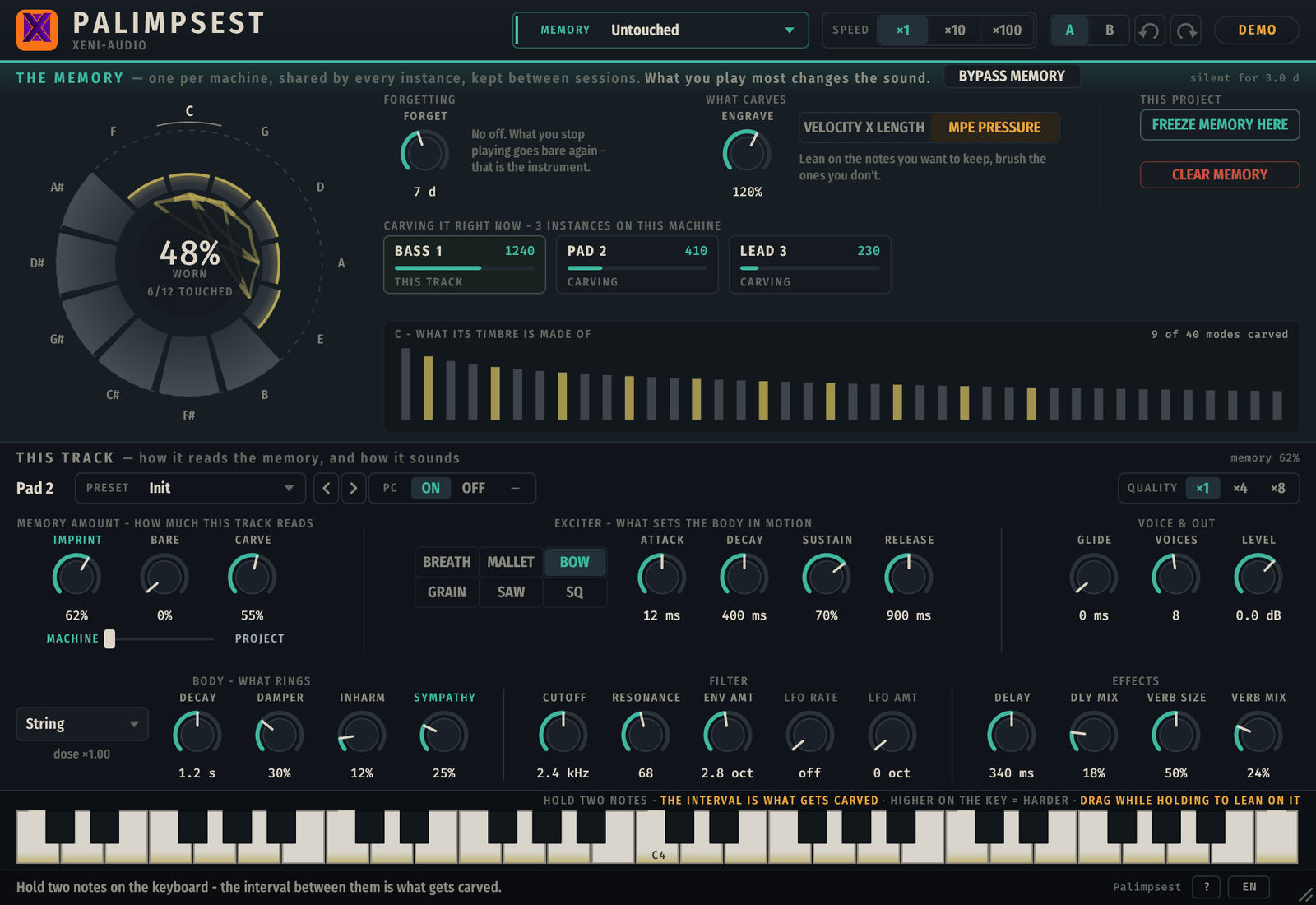
Palimpsest interface — the memory band with the twelve-segment wear map, the two laws Forgetting and Engrave, the shipped-memory selector, and below it this track's preset, body, exciter, ladder filter and outputs

The top band is the memory — the map shows what has been carved, warm when fresh, verdigris as it ages. Below it, this track: the body that rings, what sets it in motion, the filter, the outputs.

The Memory Is the Timbre

Every synth sounds the same on the day you buy it and on the day you sell it. Palimpsest doesn't: after a month it sounds like the way you play — and nobody else's does.

✍️
The Interval, Not the Note
It takes two notes to write — together, or one after another. The interval between them is what gets carved, so a fifth in C and a fifth in F# wear the same groove. The intervals you lean on grow into the timbre as overtones.
🎻
Sympathetic Strings
Strings tuned to the intervals your memory holds start ringing under your melody and keep ringing after the note. Lean on fifths and every note you play gets answered a fifth away. A fresh Palimpsest has none: they are earned.
🌫️
Forgetting Is Structural
There is no off switch. What you stop playing goes bare again, in days of wall-clock time — it forgets even while your DAW is closed. Play something else and the old answers fade while the new ones arrive.
🧠
One Memory per Machine
Not per track, not per project. Every instance in every session reads and carves the same memory through shared memory, and it survives the session: close your DAW tonight, open it next week, it still remembers you.

Watch the Memory Carve

A player leans on fifths, then on thirds, then stops. Each interval inks its segment on the map, a sympathetic string tuned to it starts answering, and everything that is no longer played fades.

● THE MEMORY — twelve intervals, one map what is played is written · what is not is forgotten FRESH MEMORY
✍️ Two notes write one interval — never a note 🎻 A carved interval becomes a string that answers 🌫️ Fresh ink is warm, old ink is verdigris, silence erases

In the plugin, that's the map in the top band — twelve segments, one per pitch class, and a detail strip showing the forty modes actually sounding.

Two Laws, and Memories You Can Load

Engrave sets how strongly playing writes; Forgetting sets how long silence takes to erase. Load a memory somebody else carved — Gospel keys, Modal techno, Flamenco, Gamelan — play on top of it, and it becomes yours. Freeze one into a project when a track must stay the way it was recorded. And a Speed switch — ×1, ×10, ×100 — makes the whole machine remember and forget faster, to hear in a minute what would take a week.
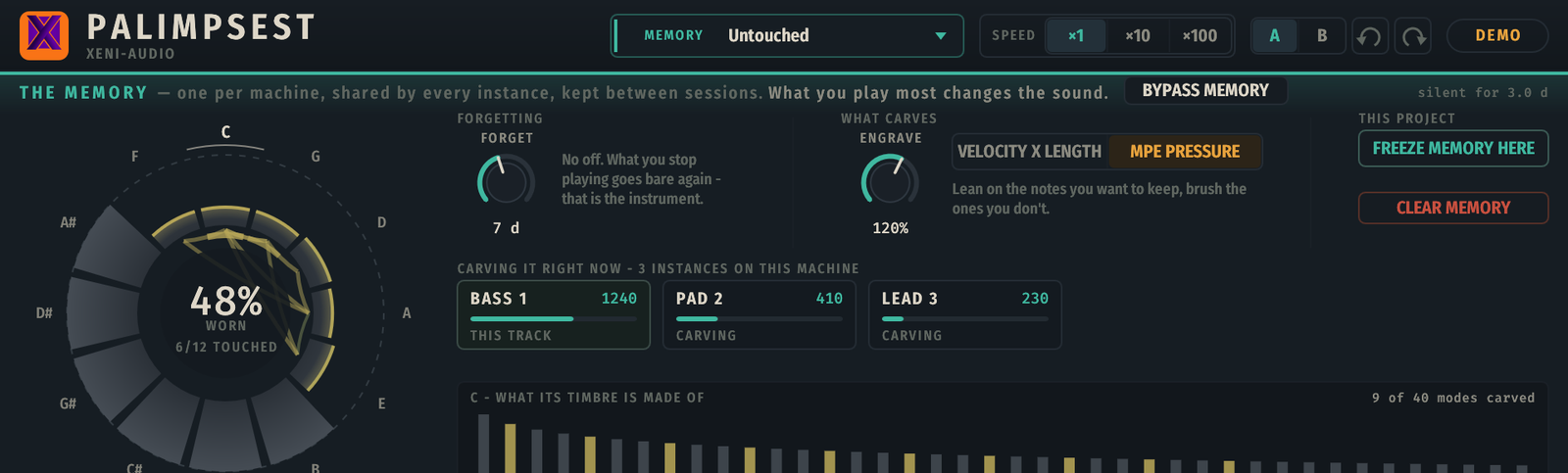
The Palimpsest memory band — the twelve-segment map, the Forgetting and Engrave laws, the Velocity × length / MPE pressure switch, Freeze memory here, Clear memory, the Speed switch and the instance park

The instance park at the right names every Palimpsest running on this machine and what each one is carving — all into the same memory.

Your Strings, Behind Any Synth

Palimpsest's sympathetic strings, and the memory that shapes them, also ship as an audio effect. Put PalimpsestFx after any synth — yours, the one you already love — and the strings answer that sound, tuned by the intervals the machine has learned. It reads the very same memory Palimpsest reads and writes; what plays through it carves the memory too. Same installer, same key.

PalimpsestFx interface — the shared memory band with the wear map, Forget and Engrave, the instances carving it; below, this track's Body, Sympathy, Imprint, Decay, Inharm, Damper, Dry, Level and the Notes source picker set to Link 2

The top band is the memory, the same one the instrument shows. Below it, this track: which body rings, how loud the strings answer, how much the memory colours them — and where the notes come from.

🎛️
It Needs the Notes
The strings are tuned from the notes the synth plays, so the effect listens to MIDI as well as audio. Set Notes to MIDI in and it reads this track's notes — REAPER and Bitwig pass them through the effect chain on their own; Live, Cubase and Logic need a MIDI route (in Logic it is a MIDI-controlled effect).
🔗
Or Use PalimpsestNotes
A tiny MIDI helper that goes before the synth. It lets everything through and hands the notes to PalimpsestFx on a link, 1 to 8 — no routing, even across tracks. Pick the same number on both sides and you are done. Put an arpeggiator after it: the strings hear what the synth really plays.
🧠
One Memory, One Key
Every Palimpsest and every PalimpsestFx on the machine carves and reads the same memory; the effect's panel shows who is carving right now. The licence key you already have unlocks PalimpsestFx; PalimpsestNotes needs none. Owners of 1.0 update for free.

Everything You Need

🔔
Eleven Bodies, Six Exciters
A modal synth: a measured physical body — from a struck key to a bowed string to a cracked bell — set in motion by a pluck, a strike, a bow, noise, a saw or a square. Then a ladder filter and effects.
🎹
84 Presets That Tell Stories
Keys, pads, bass, leads, textures, machines, percussion. Every preset sounds different on every memory — the preset is the instrument, the memory is who has been playing it.
📚
Shipped Memories & Yours
Memories someone already carved for eight minutes — Gospel keys, Modal techno, Whole-tone, Flamenco, Gamelan, Delta blues, Pastorale. Save yours, name them, come back to them. Loading one backs up the current one first.
🎚️
Imprint, Sympathy, Carve
Per track: how much the memory colours the timbre, how loud the sympathetic strings answer, and how much this track carves. A track can read the memory without writing it — or write without reading.
🔀
Three Stereo Outputs
Main is the instrument. Bare is the same notes on a fresh, untouched Palimpsest. Wear is exactly what your memory adds. Keep the melody on one track and its wear on another, with its own effects.
🖐️
MPE: Pressure Engraves
With an MPE controller, pressure is what writes — press hard on what you want to keep, brush what you don't. On an ordinary keyboard, velocity and held length do the same.
❄️
Freeze Memory Here
Keeps a copy of the current memory inside the project file. The live memory keeps evolving; the frozen one does not. A Machine ↔ Project fader blends between the two.
🎛️
PalimpsestFx & PalimpsestNotes
The strings as an audio effect behind any synth, reading and carving the same memory, with the same Body, Sympathy, Imprint, Decay, Inharm and Damper — plus Dry and Level. PalimpsestNotes carries the notes to it from before the synth, no routing.
📖
Guided Tour & Six Languages
A tour at first launch that sits next to each control, a hint bar that explains whatever you hover — in English, French, German, Spanish, Italian and Portuguese — and a full PDF manual in every download.

Not a Looper, Not a MIDI Capture

Palimpsest never records your notes and never plays them back: your melody is exactly what you played, always. It is not a delay either — nothing is repeated. Playing wears the sound itself, slowly, the way footsteps wear a stone step. The demo carves the very same memory the full version inherits.

Technical Details

Type Instrument — MIDI in, three stereo outputs (Main, Bare, Wear) · PalimpsestFx: audio effect with MIDI in, mono or stereo · PalimpsestNotes: MIDI effect
Formats VST3 · Audio Unit (macOS) · CLAP
Platforms Windows 10/11 x64 · Linux x86-64 · macOS 10.13+ (universal, Intel & Apple Silicon)
Synthesis Modal — 11 measured bodies, 6 exciters, 40 modes per voice, ladder filter, effects
Memory One per machine, shared by every instance through lock-free shared memory; persisted on disk as user data, it survives sessions and reboots
What carves Velocity × held length on any keyboard; pressure with an MPE controller
Presets 84 factory presets in seven families, user presets, Program Change
Memories Shipped memories, your own named memories, automatic backups, freeze into the project
Parameters Automatable in VST3, AU and CLAP hosts · A/B · undo
Languages Interface in English; hints, tour and info bar in EN · FR · DE · ES · IT · PT
Framework Built with iPlug2 — open-source C++ audio plugin framework
License Perpetual, all your machines, free updates. One key covers Palimpsest and PalimpsestFx; PalimpsestNotes needs none. Separate key from the other XeniAudio plugins.

Try Before You Buy

The demo is the whole instrument — every preset, every shipped memory, your settings saved with the session — and PalimpsestFx with it, in the same installer, under the same demo: the audio goes silent for five seconds every minute, in step across every instance. PalimpsestNotes has no demo limit. It keeps carving during the silence, and the memory you build in the demo is the one the full version inherits. Play it for real, over days, not over a test clip. No sign-up required.

🪟
Windows
VST3 · CLAP — Windows 10/11 x64
↓ Installer (.exe) ↓ Archive (.zip)
🐧
Linux
VST3 · CLAP — x86-64
↓ Archive (.tar.gz)
🍎
macOS
VST3, AU & CLAP — macOS 10.13+ Intel & Apple Silicon
↓ Installer (.dmg)
🪟 Windows users — SmartScreen or antivirus warning? Click here

The Windows installer isn't code-signed, so SmartScreen may flag an unknown publisher. It's not a detection — keep the file and open it.

  1. Click "More info", then "Run anyway"
  2. Or skip the installer entirely: the .zip above contains the same VST3 and CLAP files — copy them into C:\Program Files\Common Files\VST3\ and C:\Program Files\Common Files\CLAP\

macOS

Nothing to do. The disk image, the installer and all three plugin bundles are signed with an Apple Developer ID and notarized by Apple, with the ticket stapled into the files so it works offline. The publisher shows as Tony Cuny — the legal name behind Xeni-Audio, which is what Apple puts on the certificate. Logic loads the AU with no workaround.

Free demo, no sign-up required. Insert it on an instrument track and send it MIDI — a keyboard, or a clip. It makes no sound on its own, and three of its knobs do nothing until something has been carved: a fresh instrument arrives already played for twenty seconds so you hear them from the first note. After download, refer to the included README.txt and the PDF manual for installation — the manual is also readable online. The same demo is also available on Gumroad. Questions? support@xeni-audio.com

Changelog

Latest: v1.1.1all versions

1.1.113 Oct 2026

  • Lighter on the CPU, same sound: about 25% less for 16 voices, 28% less with the Bare/Wear outputs connected, 46% less on a track with Sympathy at 0. Compared blind on 12 presets: no audible difference.
  • No more DC offset on the Saw/Square presets pushed hard (Alarm, Jaw, Sinkhole, Bad tape, Undertow, Bowstring, Signal fire, Nightbus). It was inaudible but ate headroom and fooled compressors downstream. If you use the Wear output on these presets, its meter drops (the offset was part of it) while what you hear stays the same: check any compressor or limiter on that track.
  • Windows: the editor now opens on machines without graphics acceleration (Remote Desktop, virtual machines).
  • Projects saved with 1.1.0 open unchanged.

1.1.030 Sep 2026

  • New in the same installer: PalimpsestFx, Palimpsest's remembering strings as an audio effect behind any synth. It reads and carves the same machine memory, takes the notes from the track's MIDI or from the new PalimpsestNotes MIDI helper (Link 1-8, no routing). One licence key unlocks Palimpsest and PalimpsestFx; PalimpsestNotes is free of licence.
  • The instrument itself is unchanged.

1.0.128 Sep 2026

  • Linux: fixed a possible crash when closing an instance.
  • CLAP: the host can no longer put Palimpsest to sleep while its resonances, delay and reverb are still ringing. Sound unchanged.

1.0.025 Sep 2026

  • First release.
€49

One license, all formats, all platforms, all your machines, forever.

  • VST3, Audio Unit & CLAP formats
  • Windows · Linux · macOS (universal)
  • One memory per machine — every instance carves and reads it
  • 11 measured bodies, 6 exciters, ladder filter, effects
  • 84 presets in seven families, shipped memories and yours
  • Sympathetic strings tuned to what you play
  • Three stereo outputs — Main, Bare, Wear
  • MPE: pressure engraves
  • Guided tour and hints in six languages
  • All future updates
  • Separate license key from other XeniAudio plugins
Buy on Gumroad — €49
Secure checkout via Gumroad · License delivered by email