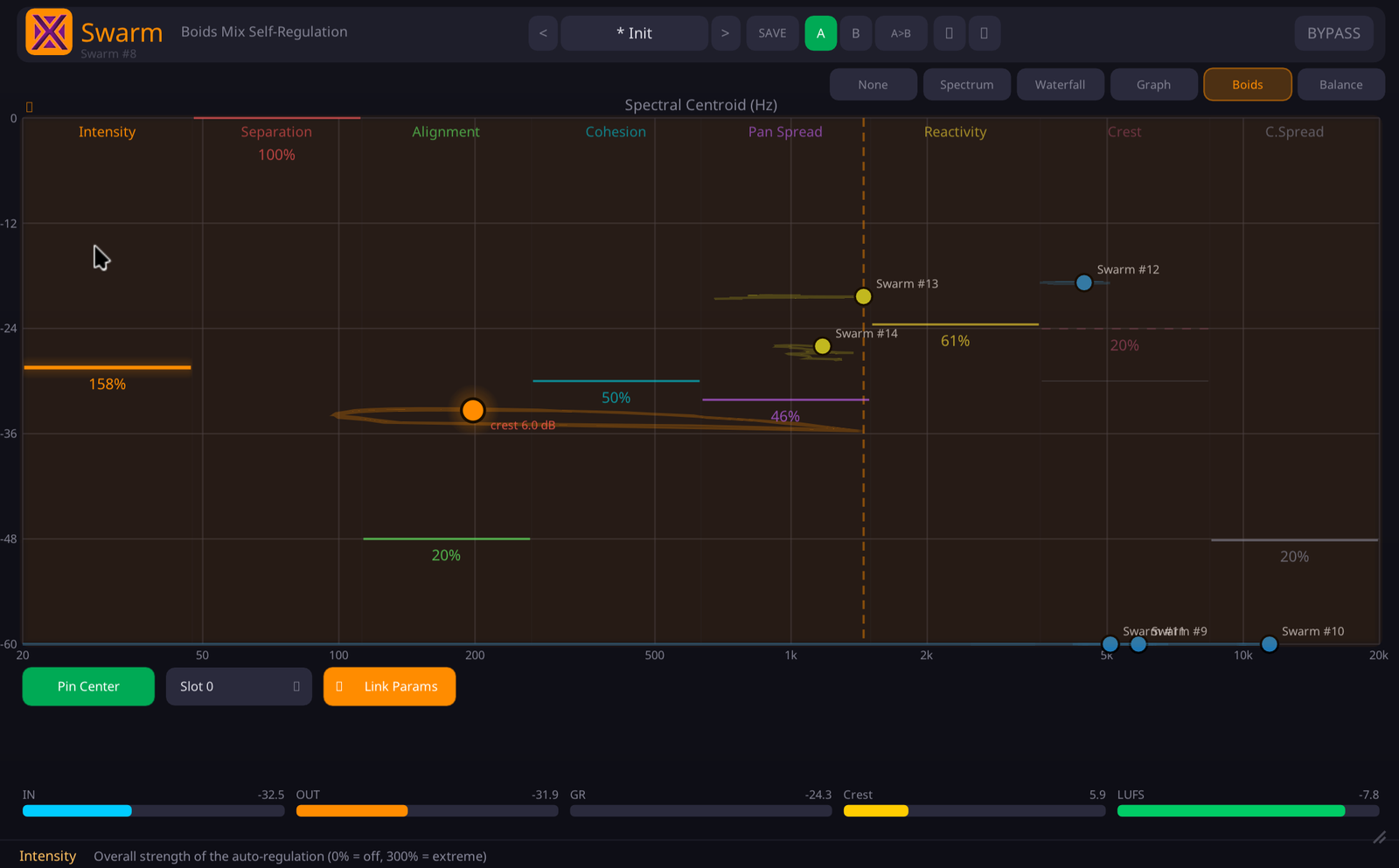
The centre of the window is a live map of your mix: every linked track is a dot, yours is the orange one, and the dashed lines are the swarm's centre of gravity.
Your tracks stop fighting for the same frequencies. Levels settle, the stereo opens — the mix moves like a flock of birds, and you never touched an automation lane.
One Swarm per track. They read each other and sort out space, level and stereo while the music plays. No master, no analysis pass.
One instance on every track of “Dark Good Time”. Flip between the flock off and on — the stereo image opens and the tracks make room for each other. Loudness-matched, so only the space changes.
Music: xeniclex · loudness-matched A/B, rendered in a real DAW.
The centre of the window is a live map of your mix: every linked track is a dot, yours is the orange one, and the dashed lines are the swarm's centre of gravity.
Every mix hits the same wall: tracks fight for the same frequencies, the vocal vanishes in the chorus, and you spend the day drawing automation and notching EQs. Swarm gives each track four rules and lets them sort it out live.
One Intensity knob rides all four forces. Start at 100 %, pull down for subtle, push up when you want it obvious.
Watch the pile in the low-mids with the swarm off — the problem you hear but can't point at. Switch it on and the tracks push apart and settle onto a common level, by themselves.
You can see why it moves what it moves: each dot is a track, placed by its tone and its level. Rare in a mixing tool.
It isn't a mastering plugin and it isn't a magic button. It's a mixing assistant that works while you work.
Others share data across a session too — but almost all make you pick a leader. Swarm has no roles: every track pushes and is pushed, and the balance emerges on its own.
If you already know which track must win and by how much, a leader-and-follower tool will do. Swarm is for the mix where that answer changes every eight bars.
I've been waiting for years for someone to create a plugin like this. … It's a project that still needs some work, but it's very promising.
At the stock settings it really is subtle but impactful. It definitely sounds like it's taking more into account than just frequency classes — most notable when pushing it to 300%.
I've tested it all the way up to full orchestral arrangements, and it has exactly the kind of subtlety that music needs while still opening up the space a bit.
| Formats | VST3 · Audio Unit (macOS) · CLAP |
| Platforms | Windows 10/11 x64 · Linux x86-64 · macOS 10.13+ (universal, Intel & Apple Silicon) |
| Channels | Stereo in / stereo out |
| Swarm size | Up to 64 instances per session, across 16 independent Link Slots |
| Inter-instance link | Lock-free shared memory — no sidechain bus, no routing, works across plugin formats |
| Metering | In / out / gain reduction, crest factor, and short-term LUFS (ITU-R BS.1770, 3 s window) |
| Presets | 5 factory presets + user presets, A/B compare, 20-step undo |
| Parameters | Automatable in VST3, AU and CLAP hosts |
| Framework | Built with iPlug2 — open-source C++ audio plugin framework |
| License | Perpetual, all your machines, free updates. Separate key from the other XeniAudio plugins. |
The demo is the full plugin — every force, every preset, your settings saved with the session. The only limit is that the audio mutes for 5 seconds every minute, with fades so it never clicks. No sign-up required.
The Windows installer is not code-signed, so SmartScreen may say the publisher is unknown, and a brand-new installer occasionally trips an antivirus heuristic. Neither is a detection — it is a reputation score that every unsigned release starts from zero.
C:\Program Files\Common Files\VST3\
and
C:\Program Files\Common Files\CLAP\
Nothing to do. The disk image, the installer and all three plugin bundles are signed with an Apple Developer ID and notarized by Apple, with the ticket stapled into the files so it works offline. The publisher shows as Tony Cuny — the legal name behind Xeni Audio, which is what Apple puts on the certificate. Logic loads the AU with no workaround.
One license, all formats, all platforms, all your machines, forever.