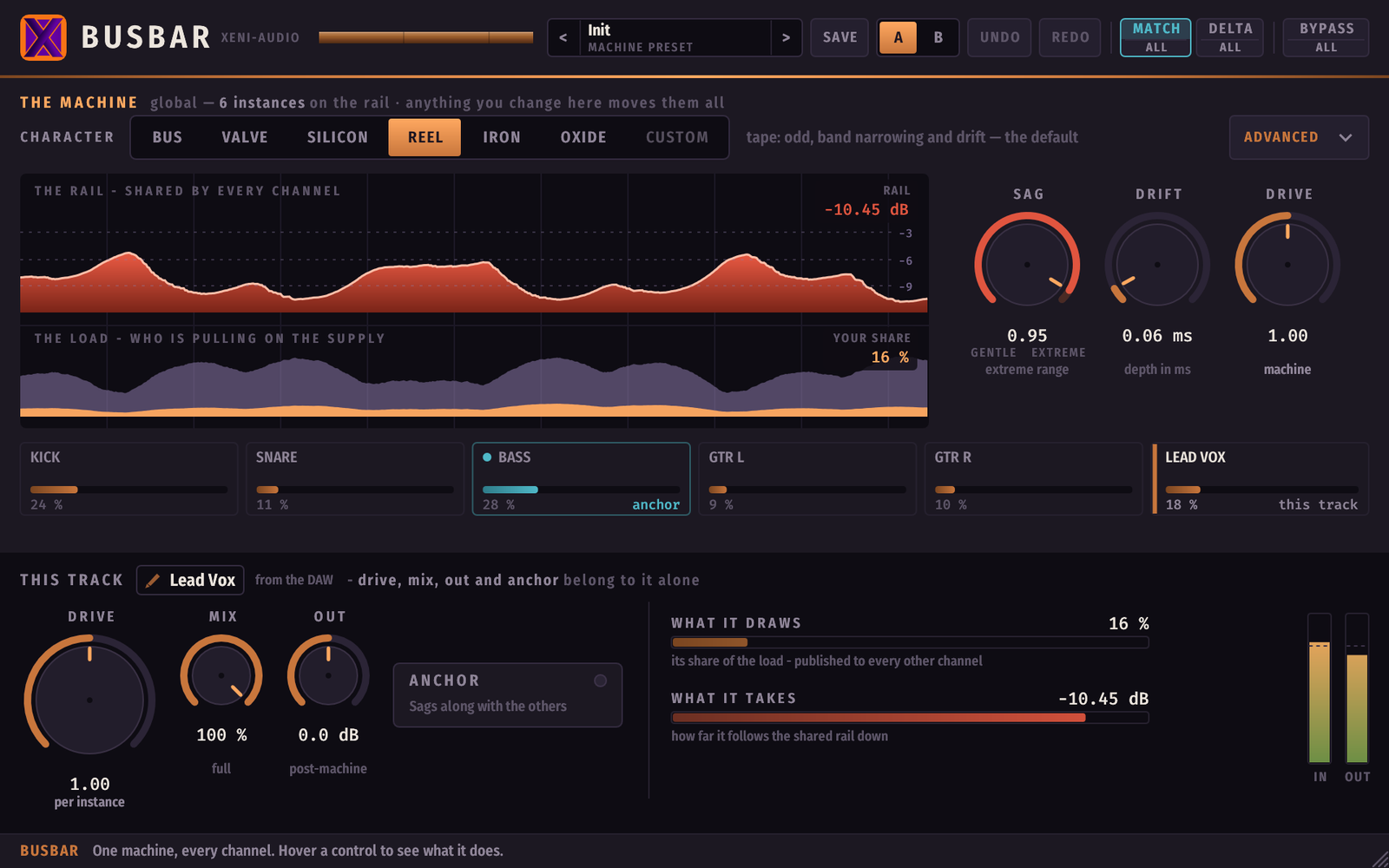
Busbar is a saturation plugin where every instance shares one single analog machine. The supply is common: what goes through one channel is felt by all the others.
Drop Busbar on as many tracks as you like. They do not become N independent saturators — they become N channels of the same machine, drawing on the same power rail and drifting on the same clock.
In two sentences
Every Busbar instance publishes how hard it is pushing. The sum of all those demands makes a single shared rail sag, which lowers the saturation ceiling of every channel at once — and one shared time base makes them all wobble together instead of blurring against each other.
That is the glue of a real console desk, and it is the one thing a per-track plugin cannot do, however good it is.
Installation
macOS
- Download the macOS disk image (
Busbar-<version>-macOS.dmg). - Open the
.dmgand double-click the.pkg. - Follow the installer. The disk image and the installer are signed with an Apple Developer ID and notarized by Apple, so macOS opens them normally. The publisher shows as Tony Cuny — that is the legal name behind Xeni-Audio, which is what Apple puts on the certificate.
- The plugin installs into
~/Library/Audio/Plug-Ins/(VST3, CLAP and AU). - Restart your DAW and rescan your plugins.
Windows
With the installer (recommended)
- Download the installer (
XeniAudio-Busbar-V<version>-Installer.exe). - Run it and follow the steps. The Windows installer is not signed — only macOS is — so SmartScreen may warn that the publisher is unknown: click "More info", then "Run anyway". A brand-new unsigned installer may also be flagged by antivirus software; that is a reputation warning, not a detection.
- VST3 goes to
C:\Program Files\Common Files\VST3, CLAP toC:\Program Files\Common Files\CLAP\Busbar.
From the ZIP
Unpack Busbar-<version>-Windows.zip and copy the VST3 and CLAP folders
into the two locations above, keeping the folder structure.
Linux
Copy Busbar.vst3 to ~/.vst3/ and Busbar.clap to ~/.clap/.
The idea
Two forces are shared by every instance.
1. Supply sag. Each channel publishes what it draws. The sum makes one rail sag, and the saturation ceiling of every channel comes down together. This is why the whole mix moves as one body instead of six unrelated ones.
2. Drift. One time base for everyone. All channels undulate in step, rather than as N decorrelated flutters that smear against each other.
Out of that comes the gesture that defines the plugin:
| what it means | scope | |
|---|---|---|
| What it draws | this channel's contribution to the shared load | published to everyone |
| What it takes | how much this channel follows the rail down | per instance |
A channel with ANCHOR engaged keeps loading the supply — so it still makes everyone else dip — but does not dip itself.
The lead vocal must not duck. But it must make everything else duck.
The panel
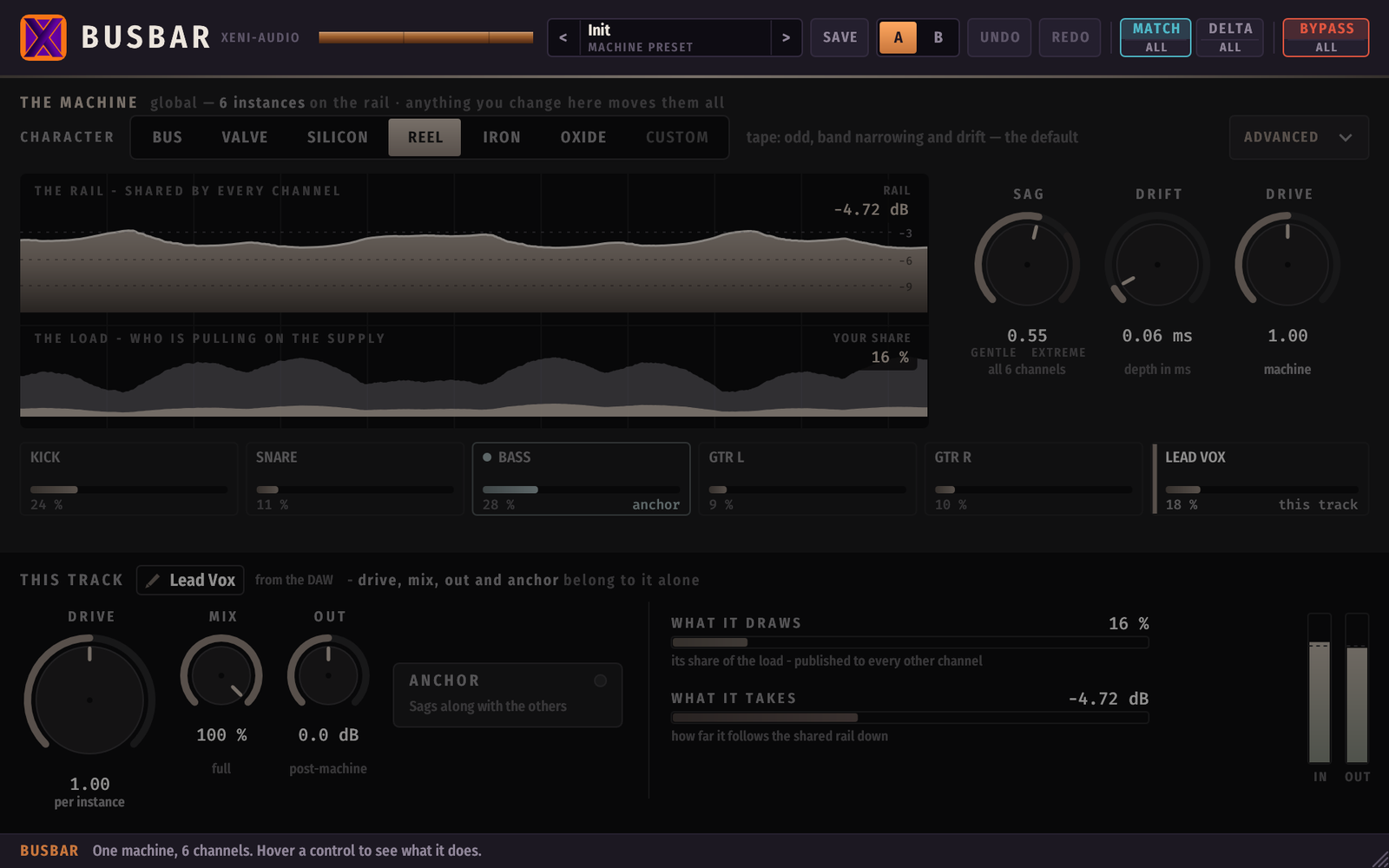
The window is one column of four bands. Hover any control and the bar at the bottom explains it.
The header

| Control | What it does |
|---|---|
Preset < name > |
The machine preset. Carries the machine only — never a track's drive, mix, out or anchor. |
| SAVE | Saves the current machine under a name you type. |
| A / B | Two live memories of the whole desk. What you leave goes into the slot you leave, so switching back returns the edits you made there. |
| UNDO / REDO | Global. One press undoes the gesture across every instance, not just the window you are looking at. |
| MATCH / All | Level-matched bypass. See The listening aids. |
| DELTA / All | Hear only what the machine adds. |
| BYPASS / All | Bypass this channel, or the whole machine. |
THE MACHINE — global
Everything in this band is shared. Change it here and it moves on every track.
CHARACTER — six voices, each modelled on a measured unit:

| circuit | knee | in one word | |
|---|---|---|---|
bus |
dual-stage valve & FET bus | the softest | even, progressive — ceilings early |
valve |
discrete triode stage | stiff | tube: breaks late, then colours |
silicon |
transistor saturator | stiff | a gentle slope that starts very low |
reel |
transformer tape stage | medium | tape: odd harmonics, band narrowing and drift — the default |
iron |
passive iron & valve | the sharpest | clean, then it breaks |
oxide |
tape bias & oxide | stiff | even and bright (+3 dB up top) |
Each character was shaped from measurements of a real hardware unit. We do not name those units: Busbar has no endorsement from, or affiliation with, any hardware maker, and naming their products would imply one.
Since 1.1.0 the saturation has a memory: each stage tracks how hard it has
been pushed over the last few milliseconds, and that history moves its operating
point — the way an output stage breathes around its bias instead of clipping
against a fixed wall. It is what lets the five non-reel characters saturate
late and stay even across levels instead of hardening the moment you pass the
knee. The memory is part of each character, not a control: there is nothing to
set.
Choosing a character loads its shape. Editing any advanced control afterwards
moves you to custom, and the panel then tells you which character it came
from.
The six characters are level-matched: switching between them changes the sound, not the loudness. (The matching is loudness-weighted — see The kick and the Drive, which is the one case where that matters.)
The "1.0 sound" badge — old projects keep their old sound
Version 1.1.0 re-voiced five of the six characters (everything except reel),
and it is the first release that changed the sound. Your existing work is not
touched by that:
- A project or preset saved with 1.0.x loads with the original 1.0 palette — it sounds exactly as it did the day you saved it.
- The header then shows a copper "1.0 sound" badge, so you always know which palette the machine is on. New projects use the current voicing and show no badge.
- Click the badge to read what changed. From there, Keep 1.0 leaves everything as it is, and Switch the machine moves the whole machine — every instance at once, with a crossfade — to the current voicing.
- The switch is one global gesture like any other machine change: UNDO brings the 1.0 sound back, across every instance.
The voicing is a state of the machine, exactly like the character: all channels are always on the same one. There is no per-track mix of old and new, because half a machine is not a machine.
ADVANCED opens the shape itself: bias, knee, tilt, the input transformer's high-pass, bump and band narrowing.
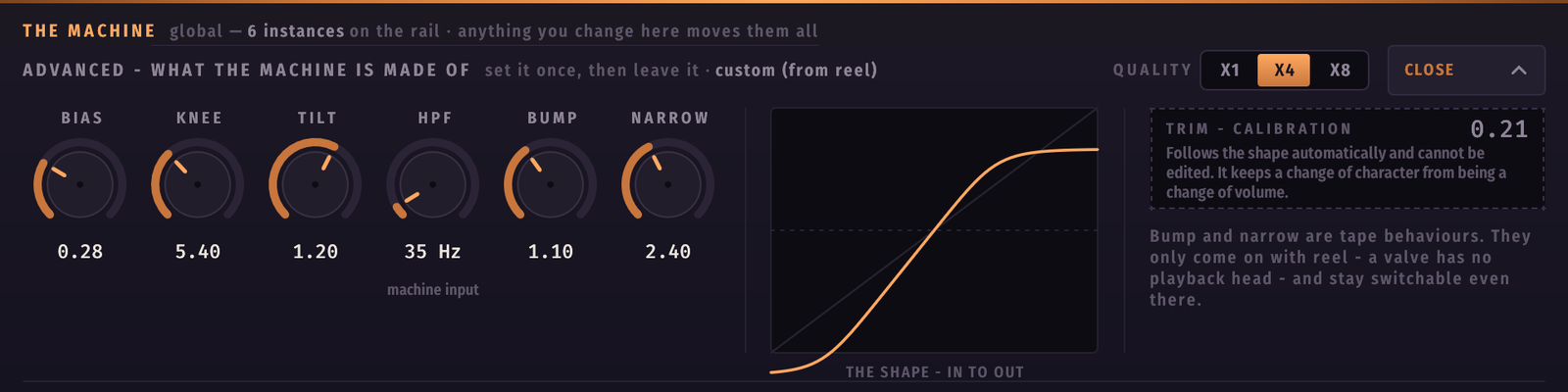
| Knob | Range | What it does |
|---|---|---|
| SAG | 0 … 1 | How far the shared rail dips under the total load. The product itself. |
| DRIFT | 0 … 1 | Depth of the shared wobble, in milliseconds. The number is the depth. |
| DRIVE (machine) | 0 … 2 | How hard the machine itself is set up, on top of each track's own dose. |
| QUALITY | ×1 / ×4 / ×8 | Oversampling. ×4 is the sane default; ×8 costs CPU for very little. |
THE RAIL and THE LOAD
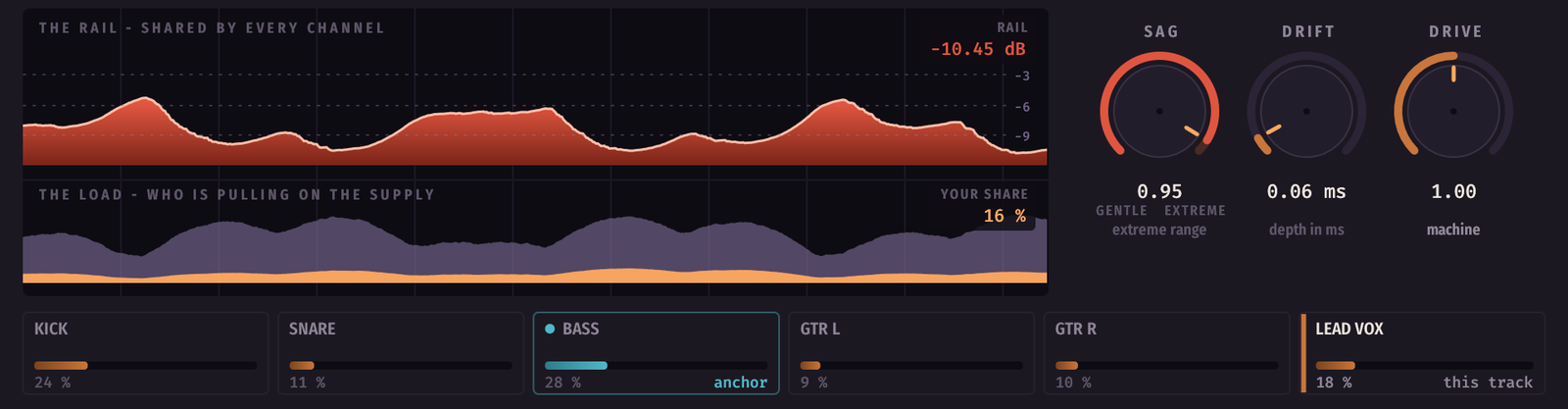
The copper bar is the rail, and it gets thinner under load — it does not grow. Below it, the stacked load shows who is pulling, with your own share in the lighter tone. You watch your own track dip because of the others.
Below that, the park: one lane per channel on the machine, each with its share and its name. Click another lane to take its controls without leaving your window; click your own to give them back.
THIS TRACK
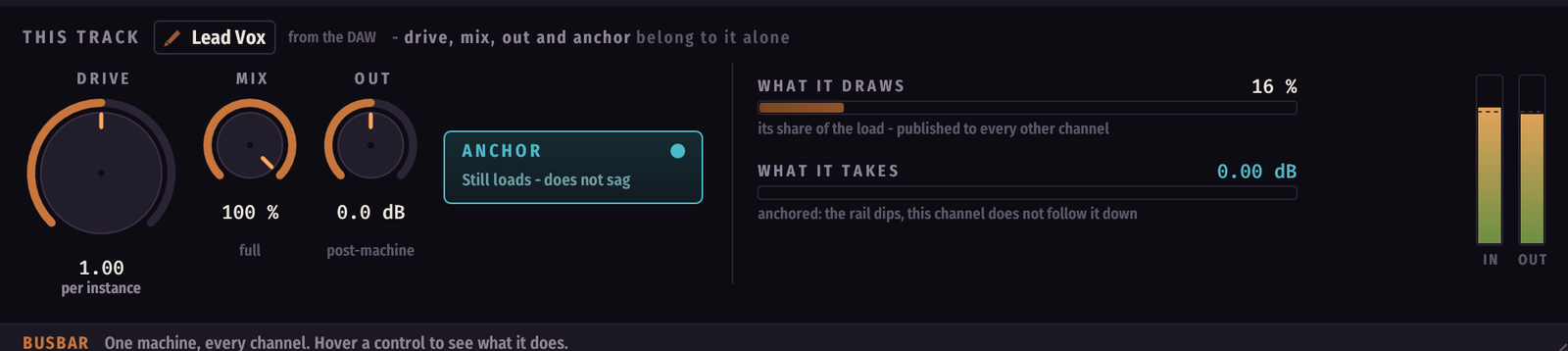
These four belong to this channel alone.
| Control | Range | What it does |
|---|---|---|
| DRIVE | 0 … 2 | The dose. How much of the machine this track takes. |
| MIX | 0 … 100 % | An output blend. ⚠️ A track at 0 % still loads the rail — it is part of the machine even when you cannot hear it. |
| OUT | −12 … +12 dB | Output trim, after the machine. Never an auto-gain. |
| ANCHOR | on / off | Still loads, does not sag. |
The listening aids
The three pills are all cut in half. The top half acts on this track; the
bottom half, marked All, acts on the whole machine at once — without
touching anybody's own switch. Turn All off and every track goes back to what
its own button said.
BYPASS — compare with and without. Either way the channel keeps loading the rail, so the other tracks sound the same while you compare. That is deliberate: if muting one track changed the rail, the comparison you are making would change the five others while you listen.
MATCH — makes bypass compare at equal loudness, so you judge what the machine does to the sound and not how much louder it made it. On by default: an unmatched A/B mostly proves you added gain. It neutralises your OUT trim and nothing else — the sag is not compensated, because losing a decibel under load is the effect, and hiding it would erase the product from its own comparison.
MATCH / All is what makes a whole-machine bypass honest from a single window:
without it, one track left unmatched is enough to skew the comparison, and
nothing on screen would tell you.
⚠️ Match only does something while something is bypassed. Pressing it on a quiet panel changes nothing — that is what it is, not a fault.
DELTA — hear only what the machine adds. A monitoring mode, not an effect: leave it on and you will render the difference instead of the mix. The panel turns violet while it is engaged, so you cannot miss it.
If Bypass and Delta end up engaged together — your track in Delta while
someone presses Bypass All from another window, say — bypass wins: you
hear the dry signal, and the violet steps aside until the bypass is lifted.
The Delta pill stays lit, because your own button has not moved.
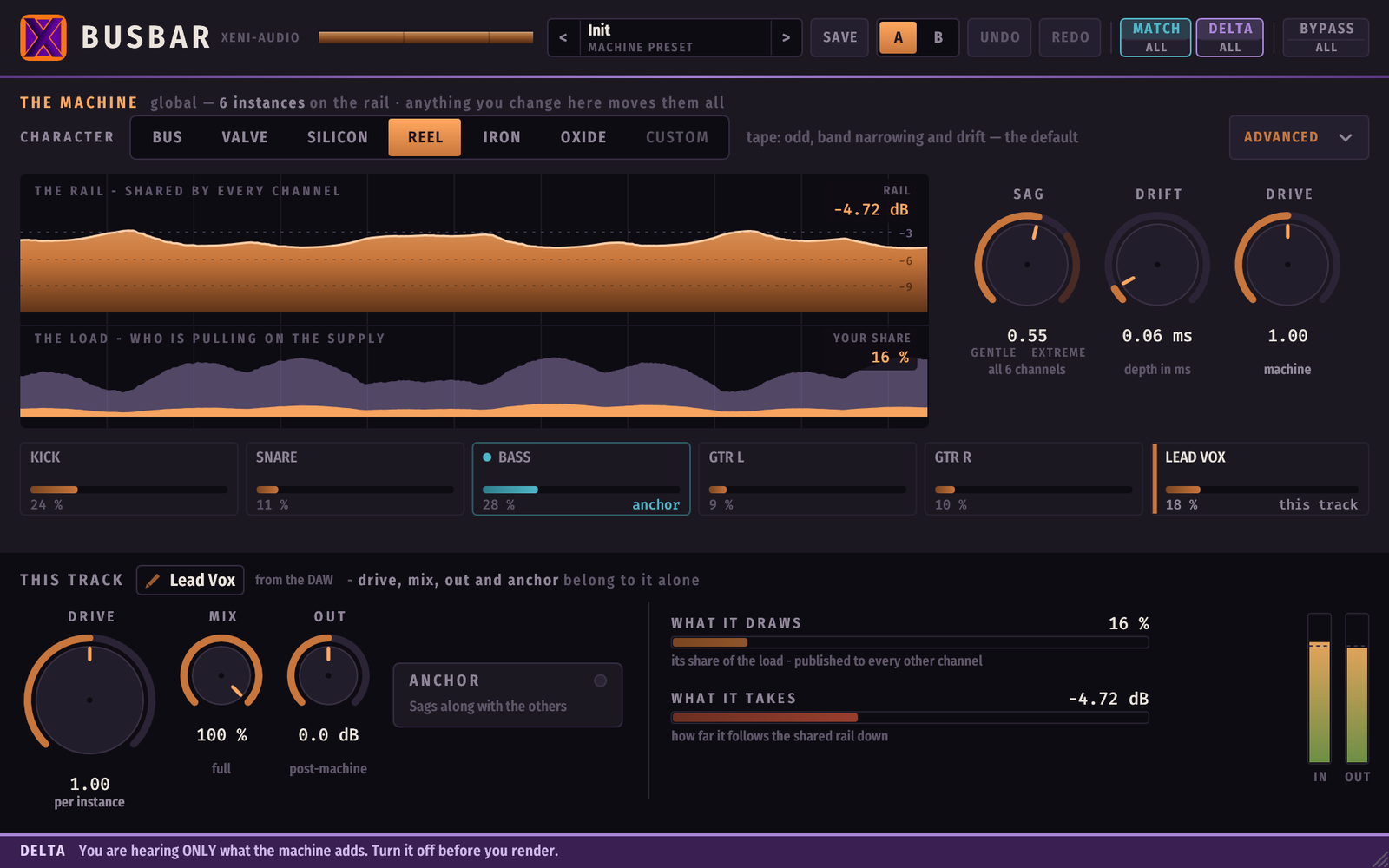
Bypass desaturates the two working bands to black and white while the pill itself stays lit in red — so you can always see where the silence comes from.
Using it
Start here
- Put Busbar on every track you want in the machine — the drum bus, the bass, the guitars, the vocal.
- Leave the character on
reeland SAG around 0.5. - Set each track's DRIVE by ear. That is the only per-track control that shapes the sound.
- Engage ANCHOR on the one thing that must not duck — usually the lead vocal or the kick.
The kick and the Drive
Pushed past Drive 1, a kick loses some of its weight against the rest of the
mix — measured on the current palette, up to about 1.4 dB of balance on
iron or silicon at Drive 1.5, and about 0.9 dB even on reel.
This is not "the machine eats the low end". It is the machine flattens whatever peaks hardest, and a kick peaks harder than anything else. It is the contract of a saturator, not a fault — and nothing on the panel flags it, because the level matching is loudness-weighted and loudness barely hears the bottom octave.
The fix is to lower the DRIVE on the kick track, and only that track
(measured on iron at Drive 1.5):
| Kick DRIVE | weight recovered |
|---|---|
| 1.50 | — |
| 1.25 | +0.28 dB |
| 1.00 | +0.46 dB |
| 0.75 | +0.59 dB |
| 0.50 | +0.59 dB |
Three quarters of a turn down gives back everything there is to get; below
0.75 it flattens out.
The character is the sound of the machine. The Drive is the dose. A kick needs a smaller dose than the rest — that is a property of its envelope, not a fault of the machine.
This is exactly why the drive is per track while the character is shared: the machine imposes one sound on everybody, and each track chooses how much of it to take. The kick takes less and keeps its weight, without anyone else changing.
⚠️ Pushing OUT is not the same thing. OUT gives back the level, not the shape: the kick is still flattened, just louder — which reads as "as loud, less weight". The drive acts on the cause.
Anchors
An anchor is not a bypass. The channel still saturates, still loads the rail, still makes everybody else dip — it simply does not follow the rail down itself. Use it sparingly: two or three anchors in a mix is a lot, and if everything is anchored there is nothing left to sag.
Editing another track
Click any lane in the park to take that track's controls in your own window. A
violet EDITING band tells you where you are, and the change reaches the other
instance even if its window is closed. Click your own lane to come back.
Double-click a lane's name to rename it. The name is yours, not the DAW's, and it travels to every other park.
Presets, A/B and undo
A preset carries the machine only — character, advanced shape, sag, drift, machine drive, quality. It deliberately does not carry any track's drive, mix, out or anchor: recalling one must never flatten the balance of six tracks in a single gesture.
The preset library is shared by every instance and lives on disk. Save one on any track and it appears in every other window. The name in the header is the machine's, so every window shows the same one.
A preset also remembers which voicing it was saved on: one saved with 1.0.x recalls the 1.0 palette (and the "1.0 sound" badge appears), one saved today recalls the current one. A preset is a sound, and it stays the sound it was.
A / B holds two live memories of the whole desk. UNDO / REDO is global: one press moves every instance, because a change you made to the machine was never local in the first place.
Licence and demo
Without a licence key Busbar runs in demo: the audio mutes for a few seconds every minute, on every instance at the same moment.
Paste your key into the licence field in the panel. One instance is enough — the others notice within a tick and unlock with it.
Troubleshooting
All my instances say "1 instance on the rail". They are not seeing each other. This happens if the plugin was updated while a DAW was still running with the old version loaded. Quit every host and reopen — Busbar recovers a stale shared machine on its own once nothing is using it.
Two hosts, and the instances in one do not see the other's. Check that both hosts load the same Busbar version. Instances from different versions deliberately do not join each other's machine (each version speaks its own shared-state layout — joining anyway could corrupt both). Update everywhere and they meet again.
A track shows up twice in the park after reloading a project. It should not, and does not from 1.0.0 onward. If you see it, the ghost lane disappears within a few seconds.
Resizing does nothing in Reaper on Windows (VST3). Reaper's VST3 host ignores the resize request. Use the CLAP build there — same plugin, same shared machine, and the window resizes normally.
The window will not take my keyboard when renaming a track (Linux). Busbar only takes keyboard focus while a name is actually being typed, and gives it back on the way out. If your window manager is set to focus-follows-mouse, keep the pointer over the plugin window while you type.
Bitwig: the transport does not move while a plugin window is open. This is a Bitwig behaviour, not a Busbar one — it affects every plugin.
What Busbar does not claim to be
Busbar is not a faithful emulation, and it is worth saying plainly.
The shared sag does not exist on any hardware: an outboard manufacturer designs power supplies against exactly that, and two measured units showed 0.000 dB of inter-channel coupling. The drift, at the setting that sounds best, is around a hundred times the specification of a tape machine.
It is a deliberate effect. That is also precisely what makes it hard to copy: a plugin that models one box faithfully can never do this, because the thing being modelled refuses to.
Busbar — Xeni-Audio. Copyright 2026.
Something unclear, or missing from this manual? Write to support@xeni-audio.com.